Authenticator App4.2
Publisher Description



TOTP Authenticator app Enable Passkey & OTP Two-Factor Authentication (2FA App).
🔐 2FA Authenticator - Strengthen Your Online Security with Two-Factor Authentication (2FA)
Secure your digital life with Two Factor Authentication - 2FA Authenticator, an extra layer of protection, the trusted solution for two-factor authentication (2FA) and multi-factor authentication (MFA). OTP Generator generates time-based one-time passwords (TOTP) and protects your online accounts from unauthorized access with just one app.
MFA Authenticator employs a cutting-edge security method called Time-Based One-Time Password (TOTP) to generate unique codes. These codes change every 30 seconds, ensuring that even if someone intercepts one code, they cannot use it to gain access. This two step authentication or two step verification significantly reduces the risk of unauthorized access, even if your password is compromised.
Take control of your online security like never before with the 2FA Authenticator app. Combining robust 2 factor authentication or multi-factor authentication with essential features. It's your all-in-one solution for staying steps ahead of threats.
Whether you're securing social media, financial accounts, or developer platforms, 2FA Authenticator provides fast, simple, and effective security.
✅
Key Features of 2FA Authenticator:
🔒 Two-Factor & Multi-Factor Authentication
Protect your accounts with 6-digit TOTP codes that offer robust defense against unauthorized logins with 2FA passkey authentication.
📸 Easy Setup Options
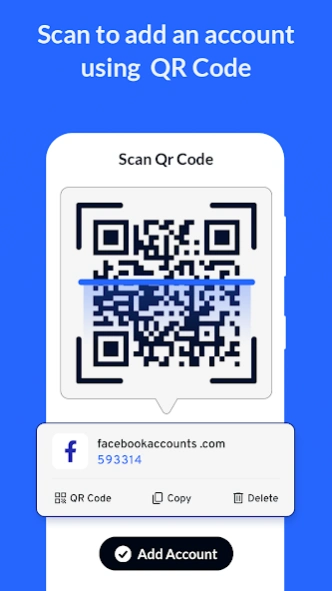
Add MFA accounts quickly by scanning QR codes, entering keys manually, or uploading QR images from your gallery.
🔄 Backup Import & Export
Easily transfer your 2FA codes to another device without the risk of losing access.
👆 PIN & Fingerprint Lock
Add a security layer to the 2FA Authenticator app itself using PIN or biometric authentication for fast and safe access.
🌍 Global Language Support
Use the 2 Factor Authenticator app in your preferred language—perfect for users across the world.
🧭 Clean & Intuitive UI
User-friendly design with easy navigation and clear steps to set up your 2FA codes.
⁜
2 Factor Authentication is compatible with all major services:
• Google, Facebook, Instagram, Discord, Twitter, TikTok, LinkedIn
• Amazon, Dropbox, GitHub, Microsoft, Outlook, OneDrive
• Coinbase, Binance, Crypto.com, Tesla, Steam, Epic Games
• And many more platforms that support TOTP-based 2FA/MFA.
⁜ Applicable across industries including:
Finance, Cryptocurrency, Gaming, eCommerce, IT, Cloud Services, Banking, and Social Media.
⁜
Why Choose 2FA Authenticator?
• Strong 2FA/MFA Protection
• Quick Setup & Code Generation
• Secure Device Access via Biometrics
• Works with All TOTP-Supported Platforms
• Trusted by Users Worldwide
• Authenticator to Enable Passkey & Two-Factor Authentication (2FA), OTP
• Our app is a great alternative to google authenticator and microsoft authenticator.
Need assistance or have feedback? Reach out at: epicstudio2017@gmail.com
Join thousands securing their accounts with 2FA Authenticator app – 2 Factor Authentication code passkey.
👉 Download the Authenticator app for Android now and stay one step ahead of digital cyber threats.
About Authenticator App
The company that develops Authenticator App is Epic Apps Studio. The latest version released by its developer is 4.2.
To install Authenticator App on your Android device, just click the green Continue To App button above to start the installation process. The app is listed on our website since 2025-07-15 and was downloaded 7 times. We have already checked if the download link is safe, however for your own protection we recommend that you scan the downloaded app with your antivirus. Your antivirus may detect the Authenticator App as malware as malware if the download link to authentic.your.app.authenticator is broken.
How to install Authenticator App on your Android device:
- Click on the Continue To App button on our website. This will redirect you to Google Play.
- Once the Authenticator App is shown in the Google Play listing of your Android device, you can start its download and installation. Tap on the Install button located below the search bar and to the right of the app icon.
- A pop-up window with the permissions required by Authenticator App will be shown. Click on Accept to continue the process.
- Authenticator App will be downloaded onto your device, displaying a progress. Once the download completes, the installation will start and you'll get a notification after the installation is finished.
Program Details
System requirements
Download information
Pricing
Version History
version 4.2
posted on 2025-07-15
Major Update.
New UI.
Major changes to the whole structure of the app.
Better user experience.
Stability Improved,
Less Ads.
version 3.6
posted on 2025-05-02
Bugs Resolved.
Stability Improved.
version 3.2
posted on 2024-08-13
Bugs Resolved.
version 2.8
posted on 2024-05-25
Minor Bugs Fixed.
Stability Improved.
version 2.7
posted on 2024-04-09
Minor Bugs Fixed.
Made Changes to the Ads.
version 2.6
posted on 2024-03-26
Stability Improved.
Bugs Fixed.
version 2.2
posted on 2024-02-15
New User Interface
New Features
Crash Resolved
Improved Stability
version 2.1
posted on 2023-12-15
Bugs Fixed.
Crash Resolved.
Improved Stability.
version 2.0
posted on 2023-10-26
All Bugs Fixed.
Crash Resolved.
New Layout.
Easy to use app.
version 1.9
posted on 2023-10-08
Minor Bugs Fixed.
Crash Resolved.
Improved Stability.
